

PSCA E-Challan Online Check by Vehicle Number 2026
The PSCA E-challan online system has been introduced in Pakistan, and people can easily check the challan by vehicle number. The system has been introduced to make traffic more disciplined and encourage people to follow traffic rules. If you violate any traffic rule, the system takes a picture on the spot and issues the e-challan against the vehicle. This guide will help you check the e-challan online by vehicle number.
What is an PSCA E-challan?
PSCA E-Challan is the online challan issuance system introduced in Pakistan. The system issues violations of traffic rules. Instead of manually issuing the e-challan, authorities now monitor the traffic violations through cameras and issue the challan electronically. The system is more accurate, efficient, and authentic, allowing for better monitoring of traffic for safer roads across the country.
Why Checking Your E-Challan Online Is Important?
Checking the PSCA e-challan for your vehicle is very important for drivers and vehicle owners. If you don’t pay the challan on time, it can lead to fines and legal action. Your vehicle may also be seized for repeated violations or for not clearing traffic fine dues. Checking the E-challan helps you keep aware of the dues and their deadline so that you can clear fines within the given time.
When you purchase a used vehicle, you must ensure that there are no fines on the vehicle. In the registration process before the vehicle is transferred to the new owner, all the dues are required to be clear. You can also track the current registered owner by online vehicle verification.
How to check PSCA e-challan online by Vehicle Number
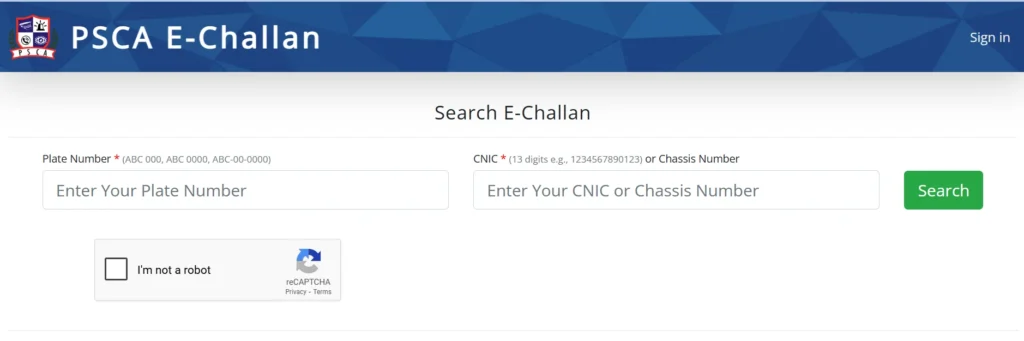
Follow the steps below to form the e-challan online by vehicle number in a simple way.
- Go to the official website of PSCA E-Challan.
- To check the e-challan, enter the vehicle registration number in the first required field.
- Enter the vehicle owner’s CNIC number or vehicle chassis number and the second field.
- Fill in the captcha form and click search. The system will fetch the details of your vehicle’s e-challan from the records and will display it on your screen.
- If you see “No Record Found,” this means there is no currently pending e-challan for your vehicle.
Information Contained in a PSCA E-Challan Online
The e-challan issued online contains the following information.
- Challan Number
- Vehicle Number
- Owner’s details (Name and address)
- Violation details
- Date and Time of Violation
- Place of Violation
- Proof of violation in Picture form
- Fine Amount
How to Pay PSCA E-challan Online?
PSCA E-challan can be paid via ATM, banks, Digital Banking apps, and the Epay Punjab app. You can pay from whichever method suits you. The most convenient way is to pay via the banking app.
Follow the steps below to pay your E-challan via the Easypaysa banking app.
- When you receive an e-challan, check it through the online portal. The challan also has the 17-digit PSID. You will make the payment using this ID.
- Open your Easypays app and go to the option of bill payment option.
- Go to the More option and select the PSCA e-challan.
- Enter your PSID and click next.
- Verify the amount to be paid, and click proceed to confirm the payment.
This is how you can pay the E-challan using the mobile banking apps. Alternatively, you can visit the bank with a copy of your challan and pay the dues there.
Alternative Methods to Check E-Challan
When the PSCA issues any e-challan online for a vehicle, it also posts a copy on the vehicle owner’s registered address and sends an SMS to the registered owner. For peace of mind, you can check the e-challan through different means to confirm no fines to clear for the vehicle. You can confirm the vehicle challan using:
Epay Punjab App
Open your Epay Punjab app and click on the option of PSCA E-challan.
Enter the required vehicle registration number and owner CNIC number or vehicle chassis number.
Click search to check the challan issued for your vehicle.
Via SMS Service
You can send the vehicle registration number to the designated number according to your area and get the e-challan issued for that vehicle.
Traffic Police Offices
If you are facing any issues or challenges with verification for any of the methods, you can visit your nearest Traffic Police office. They will confirm the challan issued for your vehicle.
Common Reasons for Traffic E-Challans
- Driving above the Speed limit.
- Riding a bike without a helmet.
- Driving the car without a seat belt.
- Wrong Parking
- Driving in the wrong lane.
- Using a mobile phone while driving.
- Crossing the red light or breaking traffic signals.
Tips to Avoid Future Traffic PSCA E-Challans
Always follow the traffic rules it not only saves you from fines or challans but also is best for the public and safety. Following the traffic rules ensures safer roads for the public. Follow the tips below to avoid an e-challan online and have a safe ride.
- Follow the speed limit.
- Wear a helmet while riding the bike.
- Wear a Seat belt while driving the Car.
- Always be in your lane and do not overtake.
- Park your vehicle in the vehicle parking zone.
- Don’t use mobile phones while driving.
- Follow the traffic signals.
Conclusion
PSCA E-Challan online system in Pakistan makes it easier for vehicle owners and drivers to stay aware of traffic fines and maintain legal compliance. By checking your e-challan regularly, you can ensure that any pending fines are cleared on time, avoiding additional penalties, legal issues, or even vehicle seizure. The system is designed to encourage disciplined driving and improve road safety by automatically monitoring traffic violations through cameras.
E-Challan also helps buyers of used vehicles verify that the car they are purchasing does not have any outstanding fines. Payments can be made online via banks, mobile banking apps, or the Epay Punjab app, making the process convenient and fast. Overall, using the online e-challan system helps drivers stay responsible, ensures safer roads for everyone, and provides a transparent way to track and pay fines.