
MTMIS Record Not Found: Causes and Solutions 2026
Encountering an MTMIS record not found message can be frustrating, especially when you urgently need vehicle details for verification, resale, or compliance purposes. The MTMIS (Motor Traffic Management Information System) is a key tool used by authorities to track vehicle registration and history, but it doesn’t always display records immediately.
This issue commonly arises when a vehicle is not showing in the system due to delays in registration, excise updates, or data entry errors. Understanding why this happens can save time and prevent unnecessary stress. In this guide, we’ll break down the main reasons behind the error and provide clear, actionable solutions to get your vehicle information properly reflected in MTMIS.
Understanding the “Record Not Found” Message in MTMIS
Seeing the MTMIS record not found message can be worrying, but it doesn’t always mean something is wrong with your vehicle or the system. In most cases, this message simply indicates that the system cannot locate the specific record you are searching for.
Common scenarios include:
- The vehicle is newly registered, and the data has not yet been uploaded to the MTMIS database.
- There are minor discrepancies in the registration details entered, such as a typo in the plate number or chassis number.
- The vehicle is registered under a different category or name, making it a temporarily unregistered vehicle not show in your search.
- The record exists but is under maintenance or verification in the MTMIS system.
Understanding these scenarios helps reduce unnecessary worry. In most cases, this is not a system error but a matter of timing or data entry.
Common Causes of “Record Not Found” in MTMIS
Seeing an “MTMIS record not found” message can be confusing and stressful, especially when you need vehicle information urgently. Understanding why this happens can save time and prevent unnecessary panic. Several administrative, procedural, and technical factors may cause a vehicle to be missing from the MTMIS database. Here are the most common reasons:
- Excise or Tax-Related Issues
One of the most frequent causes is pending or unprocessed excise duties. When a vehicle owner has not fully paid the required taxes, or if the payment hasn’t yet been updated in the system, the MTMIS will not display the record. For instance, a new car imported into Pakistan might show “record not found” until all excise duties are cleared and verified by the authorities. Excise issues can also arise if the payment receipt is misplaced or incorrectly processed, temporarily hiding the vehicle from the system. - Registration Delays
Vehicles need official registration to appear in the MTMIS. Delays can occur if the vehicle’s registration documents are incomplete, signatures are missing, or required inspections are not yet recorded. For example, a recently purchased second-hand car may not show up immediately because the ownership transfer is still pending with the Excise & Taxation Department. Registration delays are especially common during peak periods when many vehicles are being processed. - Data Entry or Technical Errors
Even when all payments and registrations are complete, clerical mistakes or technical glitches can prevent a vehicle from appearing. This includes human errors during data entry, missing updates from field offices, or temporary system outages. In these cases, the vehicle may be fully compliant but still result in a “vehicle not showing” message until the database is corrected. Such errors usually resolve once the data is reviewed and synchronized in MTMIS.
By identifying the likely cause behind an MTMIS record not found message, vehicle owners can take targeted steps—whether paying pending duties, completing registration, or contacting the authorities to fix technical errors—to resolve the issue quickly.
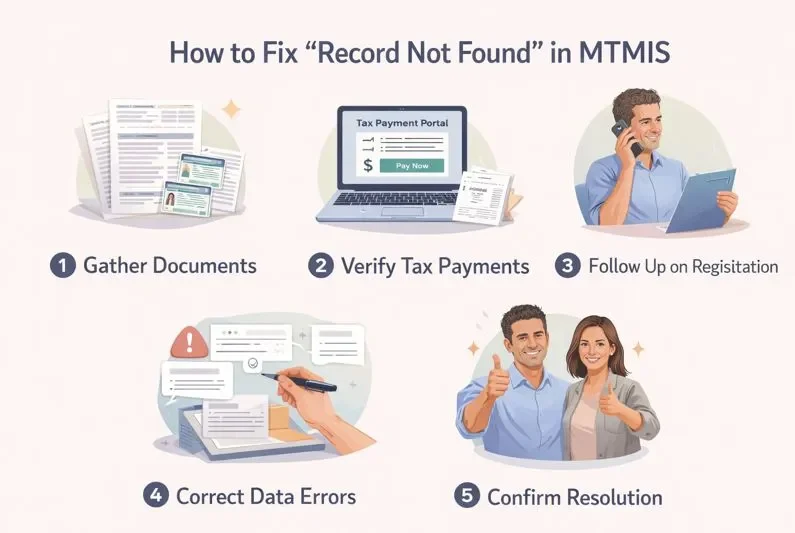
Step-by-Step Solutions to Fix “Record Not Found”
Facing the dreaded “Record Not Found” message in MTMIS can be stressful, especially if you need your vehicle for daily use or official purposes. The good news is that this issue is usually fixable with systematic steps. By following the right process, you can identify the cause and resolve it without unnecessary delays. Below is a step-by-step guide to help vehicle owners and dealers tackle this problem efficiently.
Step 1: Gather Required Documents
Before taking any action, make sure you have all necessary documents ready. This helps prevent repeated visits to the authorities. Typical documents include:
- Vehicle registration book or sale certificate
- Valid CNIC of the owner
- Payment receipts for taxes, excise, or fines
- Dealer invoice (if recently purchased)
Having these documents ensures you can verify your ownership and any pending dues quickly.
Step 2: Verify Excise and Tax Payments
Outstanding excise dues are one of the most common reasons for MTMIS records not appearing. Check your excise clearance status online or at your local excise office. Complete any pending payments promptly and keep the receipt for confirmation. This step resolves most cases where the record is missing due to financial clearance issues.
Step 3: Follow Up on Registration Status
If your vehicle was recently registered, system updates may take time. Contact the registration authority or check the online portal to confirm that your registration has been fully processed. Sometimes a registration delay can cause your vehicle not to appear in MTMIS even if all documents are correct. Make note of reference numbers or contact details for smooth follow-ups.
Step 4: Correct Data Errors
Errors in your vehicle’s details—such as chassis number or owner name—can prevent the record from appearing. Report discrepancies to your transport office or excise department. Submit a formal request with all supporting documents and receipts. Once the database is updated, your vehicle should immediately appear in MTMIS.
Step 5: Confirm Resolution
After completing payments, registration follow-ups, and data corrections, recheck the MTMIS system. If the record still does not appear, escalate the issue to higher excise authorities or the transport department’s help desk for assistance.
By following these steps, most MTMIS “Record Not Found” issues can be resolved quickly and smoothly.
Verifying Excise and Tax Payments
Excise dues are often the main reason a vehicle does not appear in MTMIS. Start by checking your excise clearance status online or at your local office. Ensure that all taxes and fees are paid in full, and keep receipts as proof. Resolving any pending excise issue usually updates your vehicle’s status in the system within a few days. Always double-check that the payment reference numbers are correctly recorded.
Following Up on Registration Status
If you recently registered your vehicle, it may not immediately show up in MTMIS. Contact your local registration authority or use the online portal to verify completion. Tracking the process helps you identify any registration delay and take timely action. Keep records of your inquiries to make follow-ups more effective.
Correcting Data Errors
Mistakes in vehicle details like the owner’s name, engine, or chassis number can prevent MTMIS from displaying your record. Report any discrepancies to the transport office and submit supporting documents such as receipts and registration certificates. Once the database is corrected, your vehicle will appear correctly, resolving the “vehicle not showing” issue.
Preventive Tips to Avoid “Record Not Found” in MTMIS
Experiencing a “Record Not Found” error in MTMIS can be frustrating, especially when it delays your transactions or vehicle services. The good news is that many of these errors are preventable with simple, consistent practices. By taking proactive steps, you can reduce the chances of encountering this problem and ensure your vehicle records remain accurate.
- Pay taxes on time: Late tax payments often cause mismatches in MTMIS records. Keep a calendar reminder for road tax and other vehicle-related dues to avoid excise issues.
- Ensure complete documentation: Always submit all required forms, receipts, and identification details correctly during registration or updates. Missing paperwork is a common reason for registration delays.
- Verify personal and vehicle details: Double-check the spelling of your name, address, and vehicle number before submitting documents. Even minor errors can trigger record mismatches.
- Regularly check MTMIS records: Periodic review helps detect discrepancies early, allowing you to correct them before they cause delays.
Following these tips minimizes errors and keeps your MTMIS experience smooth and hassle-free.
FAQs
Many users face issues when checking their vehicle details online, leading to frustration and confusion. Below are answers to common concerns to help you navigate MTMIS system issues smoothly.

