
How to Correct Wrong Vehicle Details in Excise Punjab
Correct wrong vehicle details with Excise Punjab .You just got your new registration smart card, and you notice your name is spelled wrong. Maybe the engine number on your papers doesn’t match what’s stamped on your vehicle. Don’t panic. This happens more often than you think.
Driving with the wrong vehicle details in Punjab can lead to serious problems. You could face fines at checkpoints. Police might suspect the vehicle is stolen. Even selling the vehicle later becomes nearly impossible with incorrect records.
The good news? The Excise & Taxation Department has a clear process to Correct Wrong Vehicle Details. This guide walks you through every step to correct vehicle record Punjab issues without wasting time or money. Whether it’s a simple name error or a complex engine typo, you’ll know exactly what to do. Make sure to check the complete vehicle registration process in Punjab.
Step 1: Identify the Type of Error in Your Vehicle Record
Before you do anything else, you need to understand what kind of mistake you’re dealing with. Think of this like visiting a doctor – you need the right diagnosis before treatment.
Take out your vehicle documents. Look at your registration book, smart card, and even old tax challans. Compare every detail with your actual vehicle and your personal ID cards.
The Excise department treats different errors differently. Some mistakes you can fix online in minutes. Others require you to bring your vehicle for physical inspection. Mixing them up will get your application rejected.
Common error types at a glance:
- Name or father’s name spelling mistakes – Clerical errors
- Incorrect CNIC digits – Data entry mistake
- Wrong address – Typing error
- Engine number mismatch – Technical error
- Chassis number mismatch – Technical error
- Vehicle color wrong – Technical error
- Engine capacity (CC) incorrect – Technical error
Here’s the simple rule: If the mistake is in text that should match your CNIC, it’s usually a clerical error. If the mistake involves parts of the vehicle you can see and touch, it’s technical.
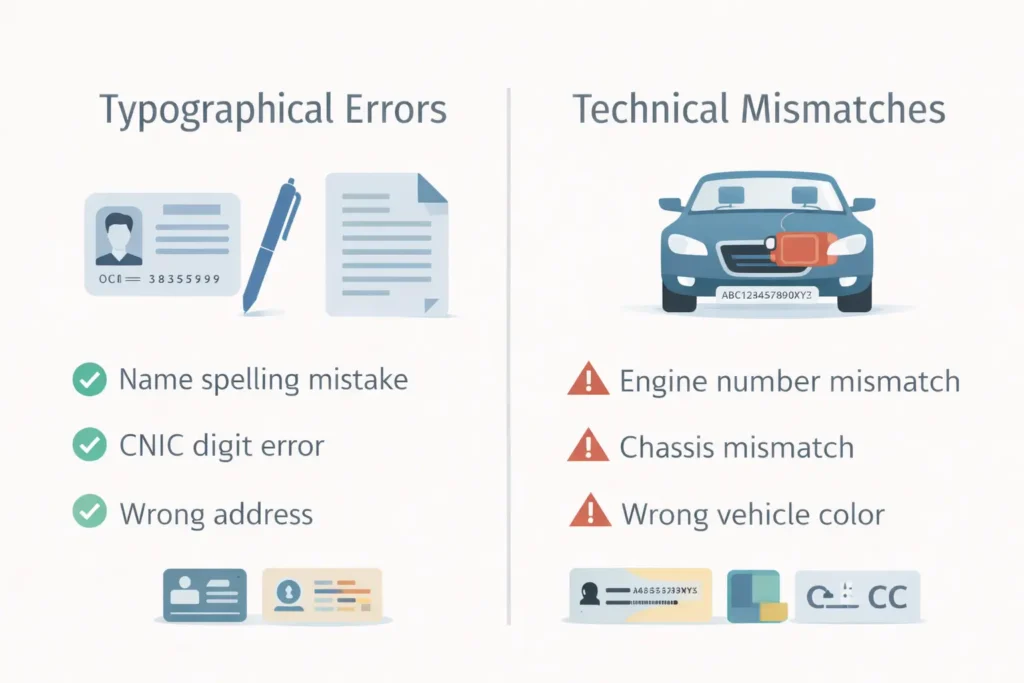
Common Typographical Errors vs. Technical Mismatches
Let’s make this crystal clear so you apply under the right category.
Typographical errors happen when the Excise officer typed something wrong. Your name might be “Muhammad” but they wrote “Mohammad.” Your father’s name might be “Hussain” but it’s “Hassan” on the card. These are simple name error situations. The information exists correctly somewhere in the system, but it was entered wrong.
Technical mismatches are different. These happen when what’s written on paper doesn’t match what’s physically on your vehicle. The most common example is an engine typo – maybe the engine number on your registration book has a “0” where your actual engine has an “O.” These errors need verification because an officer must see the vehicle to confirm the correct details.
Here’s a quick way to decide:
- Look at your vehicle’s engine block. The number stamped there must match your papers exactly.
- Check the chassis number near the windshield or under the hood.
- Compare the color of your vehicle with what’s written.
If they don’t match perfectly, you have a technical mismatch. If they match but your name is spelled wrong, it’s a typo.
Step 1: Identify the Type of Error in Your Vehicle Record
Now you know what type of error you have. The next step is collecting proof. The Excise department will not take your word for it. You must show documents that prove what the correct information should be.
Think of this as building your case. The more organized your documents, the smoother your visit to the Excise office.
Here is exactly what you need:
| Document Required | Why It Is Needed |
|---|---|
| Original Registration Book | Shows the current wrong details that need correction |
| Original CNIC | Proves your correct identity and address |
| Copy of CNIC | For the application file |
| Challan of paid Token Tax | Shows vehicle is clear with taxes (if applicable) |
| Affidavit on Rs. 50 stamp paper | Needed for major corrections like name change or engine number |
| Manufacturer’s Certificate | For engine or chassis corrections (from dealer) |
| Vehicle Sale Deed | If error came from previous owner’s documents |
| Passport size photos | For new smart card processing |
Getting these documents ready before you start the excise application process saves you from multiple trips. The affidavit is important – you can get it from any court or stamp paper vendor. Write that you are requesting correction due to a genuine mistake and take responsibility for the correct information.
For engine typo issues, the dealer’s certificate is must-have. Visit the showroom or service center where you bought the vehicle. They will issue a certificate confirming the correct engine number based on their records.
The Online Application Process
The Punjab Excise department has made the first part of this process digital. You don’t need to visit the office just to start the application to Correct Wrong Vehicle Details. You can do it from home on your phone or computer.
Here is the step-by-step process to file your correction request online:
Step 1: Visit the official Excise Punjab portal
Open your browser and go to excise.punjab.gov.pk. Look for the “Online Services” or “Citizen Services” section on the homepage.
Step 2: Navigate to vehicle services
Find and click on “Vehicle Registration” or “Motor Vehicle Services.” Every district has slightly different menus, but the vehicle section is always clearly marked.
Step 3: Select correction option
Look for “Correction/Amendment of Data” or “Correction in Registration Book.” This is the exact service you need for your excise application.
Step 4: Enter vehicle details
You will need your vehicle number – the one printed on your number plate. They call it “Fleet No.” in the system. Enter it carefully. The system will fetch all current details registered against your vehicle.
Step 5: Fill the amendment form
The form will show you the current wrong details. Below each field, there will be space to enter the correct information. Type exactly what should be there. For name, match your CNIC. For engine number, match what’s stamped on your vehicle.
Step 6: Upload documents
You will need scanned copies of your documents. Keep them ready on your phone or computer. The system tells you which document goes where.
Step 7: Submit and get challan
Once you submit, the system generates a fee challan. This is a payment slip with a unique ID. Save it and print it. The fee for correction is usually small – around Rs. 500 to 1000, depending on your district and vehicle type.
Fee Submission and Physical Verification (If Required)
With your challan generated, it’s time to pay and complete the process. This step has two paths – one for simple errors and one for technical mismatches.
Paying the fee:
Take your generated challan to any bank that accepts e-Pay Punjab payments. Most major banks like HBL, UBL, and Allied Bank do this. You can also pay online through the e-Pay Punjab website if you have internet banking. Keep the paid challan receipt safe. This is your proof of payment.
For simple name errors:
If you only have a name error or address mistake, you might not need to visit the office at all. Some districts now allow complete online processing for clerical errors. Your corrected smart card gets delivered to your home. Check with the portal after payment if your application shows “under process” without requiring a visit.
For engine typo and technical errors:
If your application involves engine number, chassis number, or color correction, you must visit the Excise office. The system will show you a message: “Physical verification required.”
You need to book a time slot for vehicle inspection. Many districts now have an online appointment system. Choose a date and time that works for you. Bring your vehicle to the Excise office at that time. The Motor Vehicle Examiner (MVE) will check the engine number, chassis number, and other details physically. They match what’s on your vehicle with what you entered in the online form.
Once the examiner verifies and approves, your file moves to the next stage. This is the final step to correct vehicle record Punjab for technical errors.
Collection of the Corrected Documents
After verification and approval, you’re almost done. Now you just need to get your corrected documents.
There are two types of documents you might receive:
Updated Registration Book:
If your district still issues the old-style registration book, you might get it immediately or the next day. Once your application is approved, the counter staff prints the updated book with correct details. Check everything on the spot. Make sure your name is spelled right, engine number matches, and there are no new mistakes.
New Smart Card:
Most districts now issue smart cards. These are printed at a central facility, not at the local office. You will not get it immediately. The processing and delivery usually take 7 to 14 working days. You can track your application status online using your challan ID or application number. The card is delivered to your home address via courier.
What to check before leaving the office:
Even if you’re getting a smart card later, the office will give you a receipt or a temporary document. Check that:
- Your name and father’s name are correct
- CNIC number matches your ID card
- Engine and chassis numbers are exactly as on your vehicle
- Vehicle color and engine capacity are right
If you spot any mistake on the receipt, tell them immediately. It’s easier to fix now than to start the process again.
Correct Wrong Vehicle Details (FAQs)
Final check:
Before you start your exercise application to Correct Wrong Vehicle Details, take a deep breath. The process is straightforward when you follow these steps in order. Identify your error, gather documents, apply online, pay the fee, visit if needed, and collect your corrected documents. Your vehicle record will be fixed, and you can drive without worry.